
how to use chatgpt for coding beginners comes down to one practical idea: treat it like a patient pair-programmer that explains, suggests, and rewrites code, but still needs you to verify and learn.
If you’re new to coding, the hardest part often isn’t typing syntax, it’s knowing what to do next when something breaks, when a tutorial skips steps, or when you’re unsure which concept matters. ChatGPT can reduce that “stuck” time, as long as you use it with the right prompts and a few guardrails.

One common misunderstanding: ChatGPT isn’t “auto-programming.” In real workflows it’s better at helping you reason, break tasks into steps, and understand errors than magically shipping perfect apps. This guide focuses on those beginner-friendly wins, plus the places you should slow down.
What ChatGPT is good at (and where beginners get tripped up)
ChatGPT shines when the task is language-heavy: explanations, step-by-step breakdowns, translating requirements into pseudocode, and suggesting alternatives. It struggles more when the problem needs your exact project context, latest library changes, or precise runtime behavior.
- Great for: explaining concepts in plain English, generating starter code, refactoring small functions, writing tests, documenting code, and walking through error messages.
- Risky for: security-critical code, anything involving secrets, production deployments, and blindly following library/API usage without checking current docs.
According to OpenAI user guidance, you should verify outputs and avoid sharing sensitive information, which matters a lot when you start pasting code from personal projects.
A simple workflow: ask, run, verify, learn
If you want one repeatable routine, use this loop. It keeps you moving while still building real skill.
- Ask: describe what you want, your current code, and what you already tried.
- Run: execute the suggestion locally, don’t assume it works.
- Verify: check output, edge cases, and whether it matches your requirement.
- Learn: ask for an explanation, then rewrite part of it yourself.
Beginners often skip the “verify” step because the code looks confident. That’s where time gets burned later.
Prompting basics that actually work for beginners
You don’t need fancy prompt tricks. You need clarity and constraints. Think of your prompt as a mini bug report or a mini ticket.
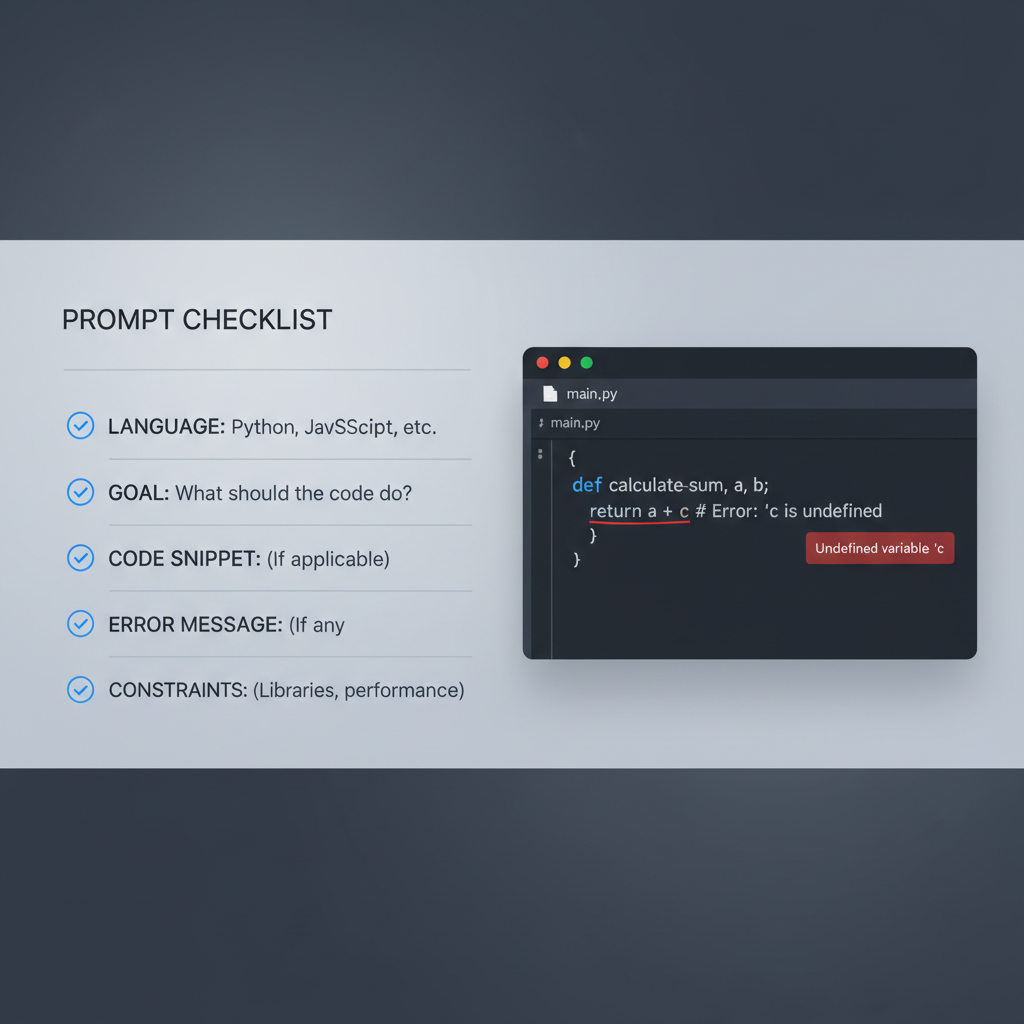
Include these 5 details
- Language and version: “Python 3.11” or “JavaScript in Node 20.”
- Your goal: what the program should do in one sentence.
- Current code: smallest snippet that reproduces the issue.
- Error message: exact text, plus where it happens.
- Constraints: “no external libraries,” “must be readable,” “explain line by line.”
Copy-and-paste prompt templates
Template: explain and fix an error
- “I’m learning [language]. My goal is [goal]. Here is the smallest code that shows the problem: [code]. I get this error: [error]. Please explain what the error means, then propose a fix and show the corrected code. After that, explain the fix in beginner terms.”
Template: build a small project step by step
- “I’m a beginner. I want to build [project] in [language/framework]. Break it into 5–8 milestones. For milestone 1, give me the exact files to create and the code to paste, and tell me how to run it. Wait for me to confirm before moving on.”
Template: learn a concept while coding
- “Teach me [concept] using a tiny example. Then ask me 2 quick questions to check my understanding. If I answer wrong, correct me with a simpler explanation.”
Use cases you’ll hit in week one (with practical examples)
These are the moments beginners repeatedly face, and where ChatGPT tends to save the most time without replacing your learning.
1) Debugging when the error message feels like another language
Paste the error and the smallest reproducible code. Then ask for two things: the plain-English meaning and a checklist of likely causes. You’ll start recognizing patterns.
2) Turning a vague idea into a plan
If you say “I want to build a to-do app,” you’ll get generic advice. If you add constraints like “command-line only,” “store tasks in a JSON file,” and “no frameworks,” you’ll get something you can finish.
3) Refactoring beginner code into cleaner code
Ask it to keep behavior the same, improve naming, and reduce repetition. Then request a diff-style explanation: what changed and why. This makes refactoring feel less mysterious.
4) Writing tests without drowning
A beginner-friendly move: ask for 3–5 tests that cover typical inputs and one edge case. Keep the scope small, like a single function.
A quick self-check: are you using ChatGPT in a way that helps you learn?
If you’re unsure whether you’re “cheating” or learning, this checklist usually clears it up.
- You can explain what the code does in your own words, not just run it.
- You can change one requirement and update the code without starting over.
- You ask why questions, not only “give me the code.”
- You keep a short notes file with the top 3 mistakes you keep making.
- You verify with docs or runtime output when something feels off.
If you answered “no” to most items, dial back the copy-paste and push for explanations plus smaller steps.
Safety and accuracy: what not to share, what to double-check
When you’re learning, it’s tempting to paste entire repos or config files. Don’t. Many issues can be solved with a small snippet and an error log excerpt.
- Don’t paste: API keys, passwords, private tokens, personal data, internal company code, or anything under NDA.
- Double-check: package names, API endpoints, library versions, and security-related suggestions.
According to OWASP guidance on common web application risks, insecure patterns like hardcoded secrets and weak input handling can cause real problems, so treat AI-generated security advice as a starting point, not a final review.

If you’re building something public-facing, even a small app, it’s reasonable to ask a more experienced developer to glance at authentication, payments, and anything handling user input.
Practical setup: tools, copy/paste habits, and a beginner-friendly system
You’ll get better results when ChatGPT can “see” the minimum context and you keep your own work organized.
Simple habits that pay off
- Keep one file called NOTES.md: paste the best explanations and your own summary in 2–3 lines.
- Paste smaller snippets: one function, one component, or one erroring file at a time.
- Ask for alternatives: “Show a beginner version” and “show a more idiomatic version.”
- Request comments: not everywhere, only where logic is non-obvious.
What to ask for, depending on your goal
| What you’re trying to do | What to ask ChatGPT for | What you should do after |
|---|---|---|
| Fix an error | Explain error, list likely causes, propose one fix at a time | Run it, then ask “why did that work?” |
| Learn a concept | Small example + 2 questions + one common pitfall | Rewrite example from scratch without looking |
| Start a project | Milestones, minimal tech stack, exact run commands | Commit each milestone, keep changes small |
| Improve code quality | Refactor with same behavior, explain changes, add tests | Compare outputs, review readability, keep the diff tight |
Key takeaways (so you can start today)
- Be specific: language version, goal, snippet, error, constraints.
- Use a loop: ask, run, verify, learn.
- Prefer small steps: one milestone, one file, one fix at a time.
- Trust but verify: confirm with runtime behavior and official docs.
If your next coding session tends to end when you hit a confusing error, try this: paste the smallest reproducible example, ask for two possible causes, apply one fix, then ask for a beginner explanation. That’s a realistic way to build confidence without pretending you’ll never get stuck.
FAQ
How do I use ChatGPT for coding beginners without becoming dependent?
Keep the model in “coach mode.” After you get a working answer, ask it to explain the solution and give you a tiny practice variation. If you can solve the variation alone, you’re learning, not just borrowing code.
What should I paste into ChatGPT when my code won’t run?
Paste the smallest snippet that still fails, plus the full error message and the command you ran. If there are multiple files, start with the file named in the traceback, then add more only if needed.
Can ChatGPT help me choose between Python, JavaScript, or Java?
Yes, for tradeoffs and learning paths, but the best choice often depends on your goals. Ask for a short comparison based on what you want to build, then pick one and stick with it for a few weeks.
Is it okay to use ChatGPT for homework or coding bootcamp assignments?
Rules vary by school and program, so it’s smart to check the policy. Even when allowed, you’ll get more value if you ask for hints, explanations, and debugging help rather than submitting untouched generated solutions.
Why does ChatGPT sometimes give code that doesn’t work?
It may assume a different library version, miss a missing import, or misunderstand your environment. When this happens, ask it to state assumptions, then confirm those assumptions against your setup and official docs.
How can I use ChatGPT to learn debugging, not just get fixes?
Ask for a debugging plan: “List 5 checks in order, tell me what each check would prove.” Then perform the checks and report back results. You’ll start thinking like a debugger instead of a code copier.
Should beginners use ChatGPT to write entire apps?
Usually it works better to build in slices. Have it generate a minimal first version, then improve one feature at a time, because big one-shot generations tend to hide gaps you won’t notice until you try to modify the code.
If you want a smoother learning curve
If you’re using ChatGPT and still feel stuck, you may do better with a more structured routine: a small project, weekly milestones, and prompts that force explanations and tests. If you want, share what language you’re learning and what you’re trying to build, and I can help you shape a prompt set and step plan that fits your time and skill level.